In this video tutorial, I show how to start / stop JBoss 6 using the plugin Cargo for Maven. And to deploy an archive.
In the previous tutorial, I created and imported the project in Eclipse with the m2Eclipse plugin.
It is more or less schematized in the following picture :
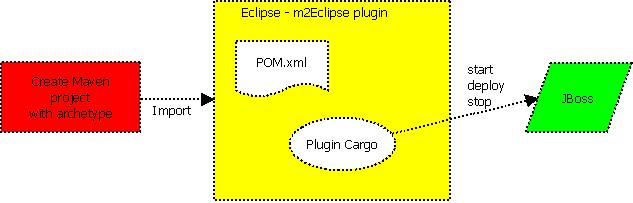
The plugin Cargo can start and stop application servers. It is possible from within the POM file to configure the required settings : host, port, timeout, JDBC datasource, JMS, JVM…
JBoss location can be definied using properties.
<properties>
    <jboss.home>d:\dev\jboss\</jboss.home>
  </properties>

<build>
    <finalName>SecondTuto</finalName>
    <plugins>
    	<plugin>
    		<groupId>org.codehaus.cargo</groupId>
    		<artifactId>cargo-maven2-plugin</artifactId>
    		<version>1.0.6</version>
    		<configuration>
			    <container>
			      <containerId>jboss6x</containerId>
			      <home>${JBOSS.HOME}</home>
			      <timeout>400000</timeout>
			    </container>
		      <configuration>
		        <type>existing</type>
		        <home>${JBOSS.HOME}\server\default</home>
		      </configuration>
		  </configuration>
    	</plugin>
    </plugins>
  </build>
Link to the video tutorial : http://www.celinio.net/tutorials/MavenTuto3.htm
Other links :
http://cargo.codehaus.org/Maven2+plugin
http://m2eclipse.sonatype.org/